
Cell service inside big concrete-and-steel buildings is never a sure thing — interior rooms, stairwells, elevators, and parking garages are classic dead spots. Wi-Fi Calling fixes that: your phone places and receives regular calls and texts over wifi instead of the cell network, so a strong signal follows you everywhere The Anderson has coverage — which is everywhere.
Why it works so well here
Wi-Fi Calling is only as good as the wifi behind it. At The Anderson that’s carrier-grade fiber with a dedicated access point in your unit and full coverage across the amenities, so your calls stay clear and don’t drop — even where your bars usually vanish. Your phone hands off automatically: when cell is weak it calls over wifi, and when you head outside it hands back to the tower.
Where it saves you
- The parking garage — take or finish a call as you walk to your car. (See: WiFi in the garage.)
- Interior rooms & high floors — no more standing by a window to keep a call alive.
- Elevators & stairwells — stay connected between floors.
How to turn it on
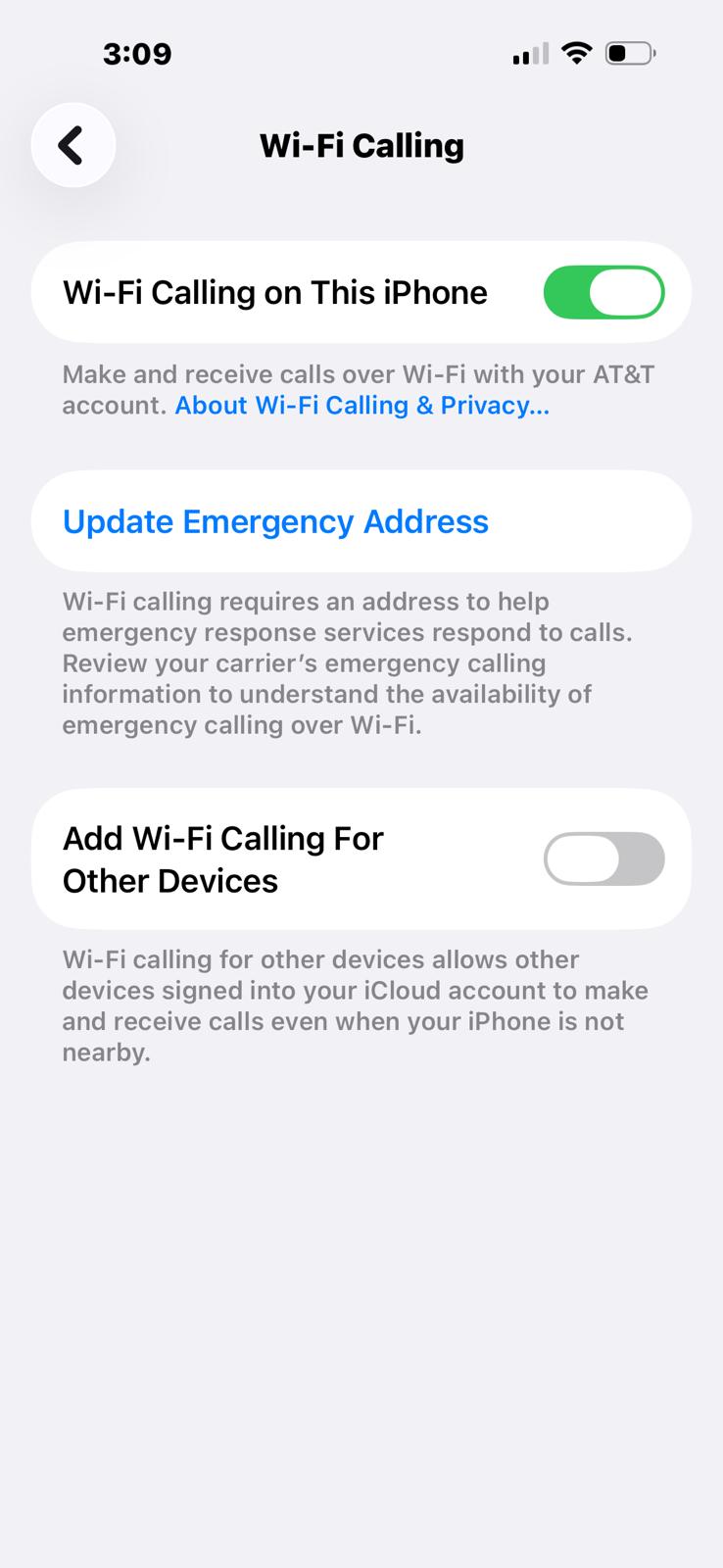
iPhone: Settings → Phone → Wi-Fi Calling, then turn on Wi-Fi Calling on This iPhone. The first time, you’ll confirm an emergency address — this is what tells 911 where you are on a wifi call, so keep it current.
Android: Settings → Network & internet (or Connections) → Wi-Fi Calling, then toggle it on.
It works with all major carriers at no extra cost — calls use your normal plan, just carried over wifi. Turn it on once and forget it.